
Fleet Camera Solutions
Truck Camera Installation Guide for Commercial Vehicle Projects
Key installation points for truck rear cameras, side cameras and monitor kits, including voltage, cable and mounting checks.
In this guide
Confirm vehicle voltage first
Truck camera products usually need DC 24V support. Before ordering, confirm whether the monitor, camera and trigger line match the truck power system.
Using the wrong voltage can cause unstable display or product damage, so voltage confirmation should be part of every truck camera RFQ.
Plan camera position and cable route
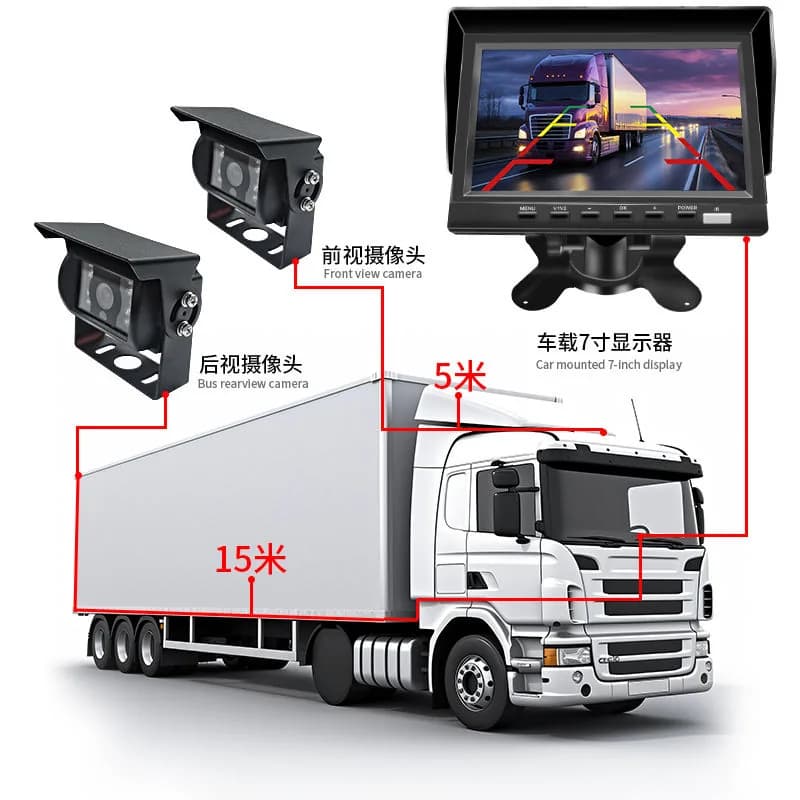
Rear cameras need a clear reversing view. Side cameras should reduce blind spots without being blocked by cargo, mirrors or trailer structure.
For long vehicles, cable length and connector type are important. Ask for extension cable options if the standard cable is not enough.
Test before final fixing
Before permanently fixing the bracket, test image direction, mirror function, trigger display, night view and waterproof connector sealing.
This step saves time and avoids reinstalling after the vehicle returns to daily operation.
Related products and pages
FAQ
Do truck camera kits support 24V power?
Truck camera kits should be selected with DC 24V support. Always confirm the exact power input before ordering.
Can one monitor show multiple cameras?
Yes. Some truck monitor systems support two-channel or four-channel camera input depending on the model.
RFQ
Need pricing for this project?
Send your target market, quantity and required functions. DubyTech will help match suitable models for wholesale or OEM discussion.