
Installation Knowledge
AHD Camera Installation Guide: How to Install and Connect
Step-by-step installation notes for connecting an AHD camera to a monitor, mirror screen or AHD DVR in vehicle projects.
In this guide
Check the system before wiring
Confirm the camera signal, monitor input, power voltage, connector type and cable length before starting installation.
AHD 1080P cameras should be connected to a monitor or DVR that supports AHD 1080P. If the monitor only supports CVBS, the image may not display.
Basic connection method
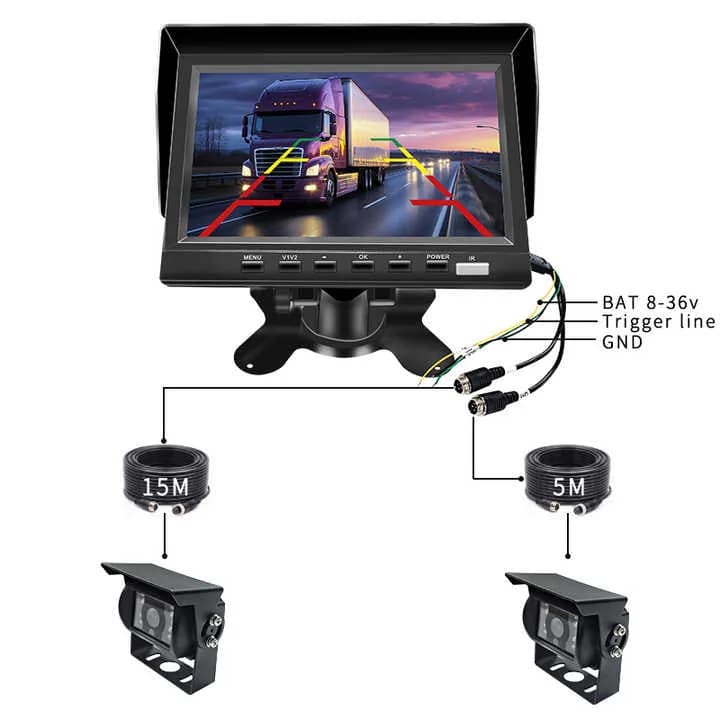
Most vehicle rear camera kits use a video cable plus power connection. Truck monitor kits may use aviation connectors that combine video and power through one cable.
For reversing display, connect the trigger wire correctly so the monitor switches to the rear camera when the vehicle is in reverse gear.
Test before final fixing
Before drilling or final bracket tightening, test image display, mirror or normal mode, parking line setting, night vision and waterproof connector sealing.
This avoids rework after the camera is already fixed to the vehicle body.
Common installation mistakes
Common mistakes include wrong signal type, reversed power polarity, loose connectors, poor cable routing, water entering the connector and using a rear mirror image camera for front view.
For OEM or fleet orders, prepare a standard installation diagram so local installers can follow the same method.
Related products and pages
FAQ
Why does my AHD camera show no image?
Check whether the monitor supports the same AHD signal, then check power, connector, trigger wire and cable damage.
Can an AHD camera connect directly to an AHD DVR?
Yes, if the DVR channel supports the camera signal and resolution.
RFQ
Need pricing for this project?
Send your target market, quantity and required functions. DubyTech will help match suitable models for wholesale or OEM discussion.